
PDF page sizes: A4, Letter, Legal and more
A4 is 210 × 297 mm, or 595 × 842 PDF points. Letter is 8.5 × 11 inches, or 612 × 792 points. Use Letter in the United States and Canada. Use A4 in most other countries. One PDF point is 1/72 of an inch.
What is the size of each PDF page format?
This table gives the portrait size of each format, width × height. A PDF file stores the page size in points. One point is 1/72 of an inch, so 72 points are 1 inch or 25.4 mm. The point values are rounded to the nearest whole point.
| Format | Millimeters | Inches | PDF points | Common use |
|---|---|---|---|---|
| A3 | 297 × 420 | 11.69 × 16.54 | 842 × 1191 | Posters, drawings, large tables |
| A4 | 210 × 297 | 8.27 × 11.69 | 595 × 842 | Letters and documents in most countries |
| A5 | 148 × 210 | 5.83 × 8.27 | 420 × 595 | Notebooks, flyers, small booklets |
| B4 | 250 × 353 | 9.84 × 13.90 | 709 × 1001 | Large forms, some newspapers |
| B5 | 176 × 250 | 6.93 × 9.84 | 499 × 709 | Books, school notebooks |
| Letter | 215.9 × 279.4 | 8.5 × 11 | 612 × 792 | Letters and documents in the US and Canada |
| Legal | 215.9 × 355.6 | 8.5 × 14 | 612 × 1008 | Contracts and legal forms in the US |
| Executive | 184.2 × 266.7 | 7.25 × 10.5 | 522 × 756 | Office notes and letters in the US |
The A and B sizes come from the ISO 216 standard. Each A size is half of the size before it: two A4 pages make one A3 page. Letter and Legal are North American sizes, and they have the same width of 8.5 inches.
To calculate points from millimeters, divide by 25.4, then multiply by 72. For example, A4 is 210 mm wide: 210 ÷ 25.4 × 72 = 595.28 points.
Which page size should you use for a PDF?
Use the paper size of the country where the reader prints the PDF. Most offices use only one size of paper.
- Letter: the United States and Canada. Also some countries in Latin America, for example Mexico.
- A4: most other countries, for example the countries of Europe, the United Kingdom, India, Japan and Australia.
- Legal: contracts and some legal forms in the United States.
- A3: a large table, a plan or a poster.
- A5: a small booklet, or two A5 pages printed on one A4 sheet.
Tip: if you do not know the country of the reader, choose A4. A4 is the most common paper size in the world. A printer with Letter paper scales an A4 page with only a small change.
When should you use Fit to image?
Fit to image is not a paper size. It makes each page the same shape as its image, so no white border shows. Use it to keep photos exactly as they are, or to show the PDF on a screen only.
Do not use Fit to image for a PDF that people print. The pages can have different sizes, and a printer adds its own white border. For print, choose A4 or Letter.
How do orientation and margins work?
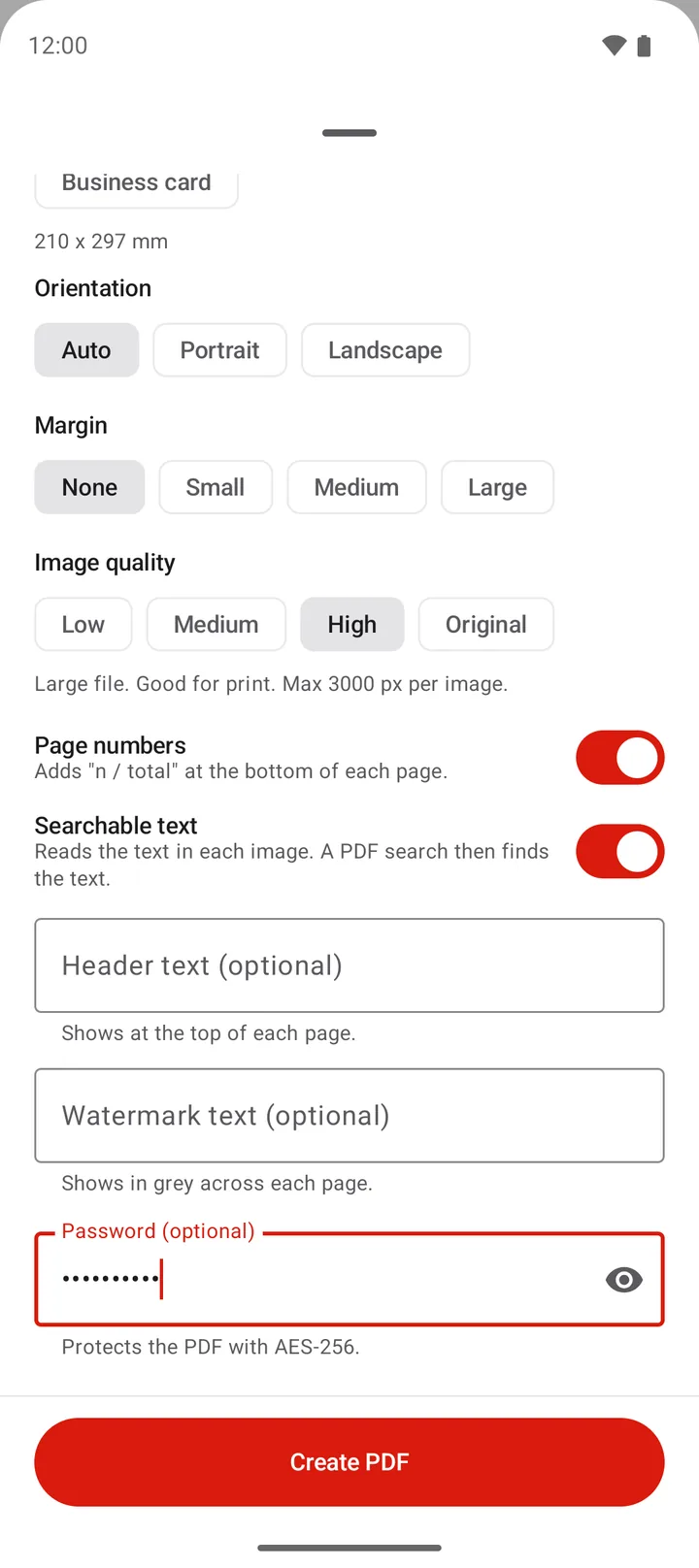
The orientation sets which side of the page is long. PDFriend has 3 options:
- Auto: a wide image gets a landscape page. A tall image gets a portrait page.
- Portrait: every page is taller than it is wide.
- Landscape: every page is wider than it is tall. A landscape A4 page is 842 × 595 points.
The margin is the white space between the edge of the page and the image. PDFriend has 4 margins:
| Margin | Points | Inches | Millimeters |
|---|---|---|---|
| None | 0 | 0 | 0 |
| Small | 18 | 0.25 | 6.35 |
| Medium | 36 | 0.5 | 12.7 |
| Large | 72 | 1 | 25.4 |
For a PDF that people print, use a Small or a larger margin. Many printers cannot print to the edge of the paper, so an image with no margin can lose a thin strip at each edge.
How do you choose the page size in PDFriend?
You choose the page size in the PDF options sheet, just before the app makes the PDF. The same sheet has the orientation, the margin and the image quality.
-
Open the PDF options
In the PDFriend editor, tap Convert to PDF. The PDF options sheet opens.
-
Choose the page size
Under Page size, select A4, Letter or another size. Select Fit to image to make each page the same shape as its image.
-
Choose the orientation and the margin
Under Orientation, keep Auto or select Portrait or Landscape. Under Margin, select None, Small, Medium or Large.
-
Create the PDF
Tap Create PDF. Every page of the PDF has the size that you selected.
Questions and answers
What is the difference between A4 and Letter?
A4 is 210 × 297 mm (8.27 × 11.69 in). Letter is 215.9 × 279.4 mm (8.5 × 11 in). A4 is about 6 mm narrower and about 18 mm taller than Letter.
What is the size of an A4 page in PDF points?
An A4 page is 595 × 842 points. One PDF point is 1/72 of an inch, so the exact values are 595.28 × 841.89 points.
Should I use A4 or Letter?
Use Letter in the United States and Canada. Use A4 in most other countries. If you do not know where the reader lives, A4 is the most common size in the world.
What happens if I print an A4 PDF on Letter paper?
Most printers scale the page to fit the paper. The page becomes a little smaller, and a white border shows at the top and the bottom. The text stays readable.
Is B5 the same size in Japan?
Not always. This guide gives the ISO 216 B sizes: B4 is 250 × 353 mm and B5 is 176 × 250 mm. The Japanese JIS B sizes are a little larger.
What does Fit to image do?
Fit to image makes each page the same shape as its image. There is no white border around the photo. The pages of the PDF can have different sizes.