
How to open DOCX file on Android and iPhone (and XLSX, PPTX)
To open a Word, Excel or PowerPoint file on Android, open PDFriend, tap More, then tap Office Reader and pick the .docx, .xlsx or .pptx file. You can also tap the file in a files or mail app and select PDFriend. The reader shows the file on the phone, and Save as PDF converts it. Old .doc, .xls and .ppt files do not open. The iPhone app has the same Office Reader.
How do you open a DOCX file on Android?
Many Android phones have no app for Word, Excel or PowerPoint files. When you tap such an attachment, nothing happens, or the phone asks you to install an app. The Office Reader of PDFriend shows these files on the phone, without an upload and without an account.
-
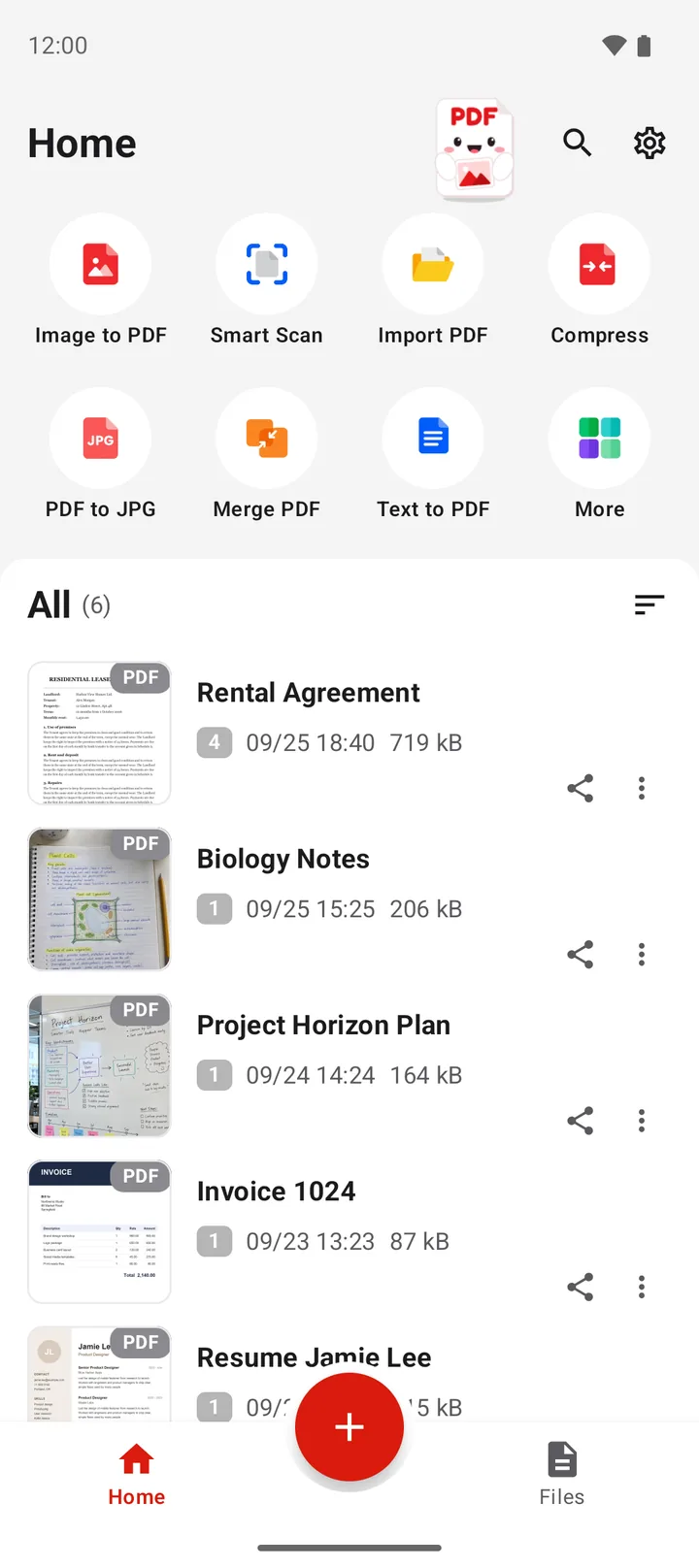
Open the More tools sheet
Open PDFriend and tap More, the last tile on the home screen.
-
Tap Office Reader
In the More tools sheet, tap Office Reader.
-
Pick the file
Pick a .docx, .xlsx or .pptx file. The document opens in the reader.
-
Save it as a PDF (optional)
To make a PDF of the file, tap Save as PDF. The PDF goes to Documents/ImageToPDF on Android.
How do you open an attachment directly?
You do not need to open PDFriend first. Android lets other apps send a file to PDFriend with "Open with" or "Share".
-
Find the file
Open the files app, or the mail or chat with the attachment.
-
Tap the file
Tap the .docx, .xlsx or .pptx file. If Android asks which app to use, select PDFriend.
-
Or share it
In apps without an "Open with" choice, tap Share, then select PDFriend.
The file opens in the Office Reader. The same works for a PDF: it opens in the PDF viewer. Read how to open a PDF on Android.
What does the Office Reader show?
| File | What you see | What does not show |
|---|---|---|
| Word (.docx) | Text, headings, lists, tables, pictures, links, footnotes | Headers, footers, columns, comments |
| Excel (.xlsx) | Each sheet in a tab, with cell formats, borders and merged cells | Charts and images. A large sheet shows its first 5,000 rows. |
| PowerPoint (.pptx) | The slides with text, pictures, shapes and tables | Charts (a gray box shows), animations, speaker notes |
For a very large sheet, the app shows: "This sheet is very large. The reader shows only the first part." The reader shows the file. It does not edit it.
Why does a file not open?
- It is an old Office file. The .doc, .xls and .ppt formats do not open. The app says: "This is an old Office file (.doc, .xls or .ppt). Save it as .docx, .xlsx or .pptx, then try again." Ask the sender for the new format.
- It has a password. The app says: "This file has a password. Remove the password, then try again."
- It is another type of file. The app says: "This file is not a Word, Excel, PowerPoint or PDF file."
- It is too large for the phone. The app says: "This file is too large to open on this phone."
How do you save the file as a PDF?
Tap Save as PDF in the reader. The app converts the file on the phone, saves the PDF in Documents/ImageToPDF on Android and opens the result screen. This works for Word, Excel and PowerPoint files.
An Excel PDF has A4 pages. A wide sheet gets landscape pages and shrinks to fit the width. For the details of each type, read how to convert Word to PDF on Android and how to convert PowerPoint to PDF on Android.
How do you open a DOCX file on iPhone?
PDFriend is also an iPhone app (iOS 26 and later). Tap More, then tap Office Reader and pick the .docx, .xlsx or .pptx file. You can also open the file from another app with "Open with". Save as PDF converts the open file. Old .doc, .xls and .ppt files do not open. The PDF goes to the folder of the app. In the Files app, open On My iPhone > PDFriend.
Questions and answers
How do I open a DOCX file on my Android phone?
Open PDFriend, tap More, then tap Office Reader and pick the .docx file. You can also tap the file in a files app or a mail app and select PDFriend. The document opens in the reader.
Why can my Android phone not open a DOCX file?
The phone needs an app that reads Word files, and many phones have none. Install a reader such as PDFriend. If the file is an old .doc file or has a password, PDFriend tells you, because it cannot open those files.
Can I open an Excel file on Android?
Yes. The Office Reader opens .xlsx files and shows each sheet in a tab. A very large sheet shows its first 5,000 rows. Excel charts and images do not show.
Can I edit the file in the Office Reader?
No. The Office Reader shows the file. It does not change it. To edit a Word, Excel or PowerPoint file, use an Office app. To change a PDF, read how to edit a PDF on Android.
Can I open .doc, .xls or .ppt files?
No. These are the old Office formats. The app says: "This is an old Office file (.doc, .xls or .ppt). Save it as .docx, .xlsx or .pptx, then try again."
How do I save a Word or Excel file as a PDF?
Open the file in the Office Reader and tap Save as PDF. The app converts the file on the phone and saves the PDF in Documents/ImageToPDF on Android.