
How to open a PDF on Android
To open a PDF on Android, tap the file in the Downloads folder of a files app, or tap the attachment in the email. Most phones open it in the PDF viewer of Files by Google or Google Drive. To read a PDF in PDFriend, tap Import PDF, pick the file, then tap it in the list.
How do you open a PDF on an Android phone?
Android does not need a special app to open a PDF. Most phones have Files by Google or Google Drive, and both have a PDF viewer. Some phone makers also put their own file manager and PDF viewer on the phone.
-
Open a files app
Open Files by Google or the file manager of your phone.
-
Go to Downloads
Tap Downloads, or the folder that holds the PDF.
-
Tap the PDF
Tap the PDF file. The phone opens it in the PDF viewer of the files app or of Google Drive.
-
Choose an app if the phone asks
If the phone shows a list of apps, select a PDF viewer. Tap Always to use it for every PDF.
A PDF viewer lets you scroll the pages and zoom in. Many viewers also have a search command and a share command.
How do you open a PDF from an email?
In the email app, tap the PDF attachment. The email app opens a preview or asks which app to use. To keep the file, tap the download icon on the attachment. The phone then saves the PDF, usually in the Downloads folder.
In a chat app, tap the document in the chat. The app opens it or asks you to choose a PDF viewer.
How do you read a PDF in PDFriend?
PDFriend has a PDF viewer, but it is not a system PDF viewer. When you tap a PDF in a files app or in an email, PDFriend does not show in the list of apps. Use the Import PDF tool instead:
-
Tap Import PDF
Open PDFriend and tap Import PDF on the home screen.
-
Pick the PDF
Select the PDF in the file picker. The app saves a copy in its list.
-
Open the PDF
Tap the PDF in the list. The PDF viewer of the app opens.
-
Type the password if necessary
If the PDF has a password, type it and tap Unlock.
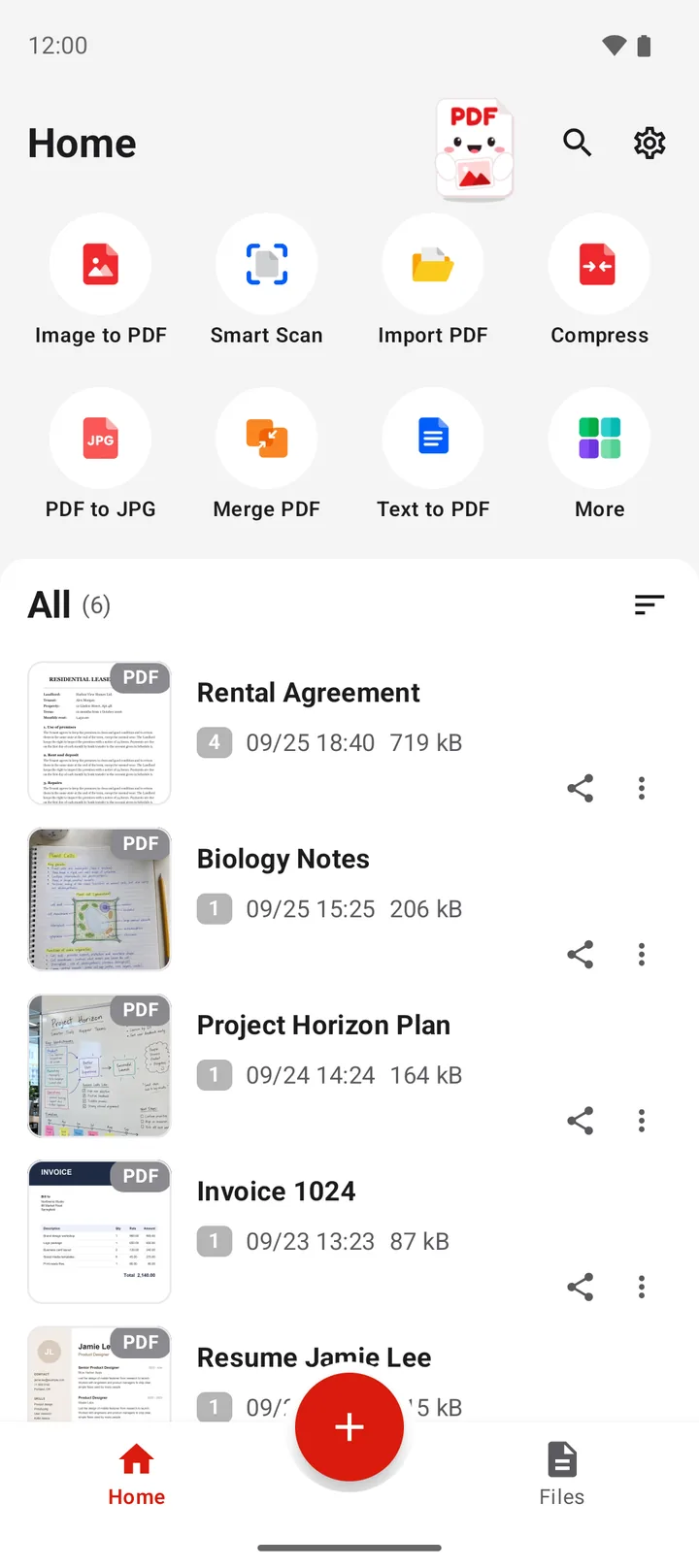
Import PDF saves a copy of the file in Documents/ImageToPDF. The original file stays in its folder. In the viewer, you can annotate and sign, extract pages, export pages as images, share and print.
The Files tab at the bottom of the app lists the PDF files of the app. With the optional All files access, the Files tab shows every PDF on the phone. Then you can open a PDF from Downloads without an import. The app works without this permission.
How do you open a PDF with a password?
A PDF with a password opens only after you type the correct password. Every PDF viewer asks for it. In PDFriend, the viewer shows "This PDF has a password. Type it to open the file." Type the password and tap Unlock. If the password is not correct, the app shows "The password is wrong."
To open the file without a password next time, save an unlocked copy. You must know the password. Read how to remove the password from a PDF.
Where are PDF files on Android?
A files app shows all the folders of the phone. These are the usual places for a PDF:
| Where the PDF came from | Usual folder |
|---|---|
| A web browser download | Download |
| An email attachment that you downloaded | Download |
| A PDF that you saved with Print, Save as PDF | The folder that you chose, often Download |
| A PDF that PDFriend made or imported | Documents/ImageToPDF (Android 10 and later) |
The files app shows the Download folder as "Downloads". To find a lost PDF, open the files app, tap the search icon and type a word from the file name.
What do you do when a PDF does not open?
- The download is damaged or incomplete. The viewer shows an error or an empty page. Delete the file and download it again on a stable connection.
- No app can open PDF files. The phone says that no app can open the file. Install Google Drive or another PDF reader from Google Play.
- The PDF has a password. The viewer asks for a password. Ask the sender for it. No app can open the file without the correct password.
- The file is not a PDF. The name ends in ".pdf", but the content is a different type. Ask the sender to send the file again.
Tip: if a PDF opens but shows the wrong pages or no text, open it in a different viewer. Viewers do not all show every PDF feature in the same way.
Questions and answers
Which app opens PDF files on Android?
Most Android phones open a PDF with the PDF viewer in Files by Google or in Google Drive. Some phone makers add their own viewer. If no app can open the PDF, install a PDF reader from Google Play.
Where do downloaded PDF files go on Android?
A PDF from a web browser or an email attachment usually goes to the Downloads folder. Open a files app and tap Downloads to find it.
Can I set PDFriend as the default PDF app?
No. PDFriend is not a system PDF viewer, so it does not show in the list when you tap a PDF in another app. To read a PDF in PDFriend, use Import PDF, then open the file from the list.
How do I open a PDF that has a password?
Open the PDF and type the password when the app asks for it. PDFriend shows "This PDF has a password. Type it to open the file." Without the correct password, no app can show the pages.
Why does my PDF not open on Android?
The three usual causes are a damaged or incomplete download, no PDF viewer app on the phone, or a password. Download the file again, install a PDF reader, or ask the sender for the password.
Where does PDFriend save PDF files?
On Android 10 and later, PDFriend saves new PDF files in Documents/ImageToPDF. The Files tab of the app lists them.