
How to unlock a PDF on Android
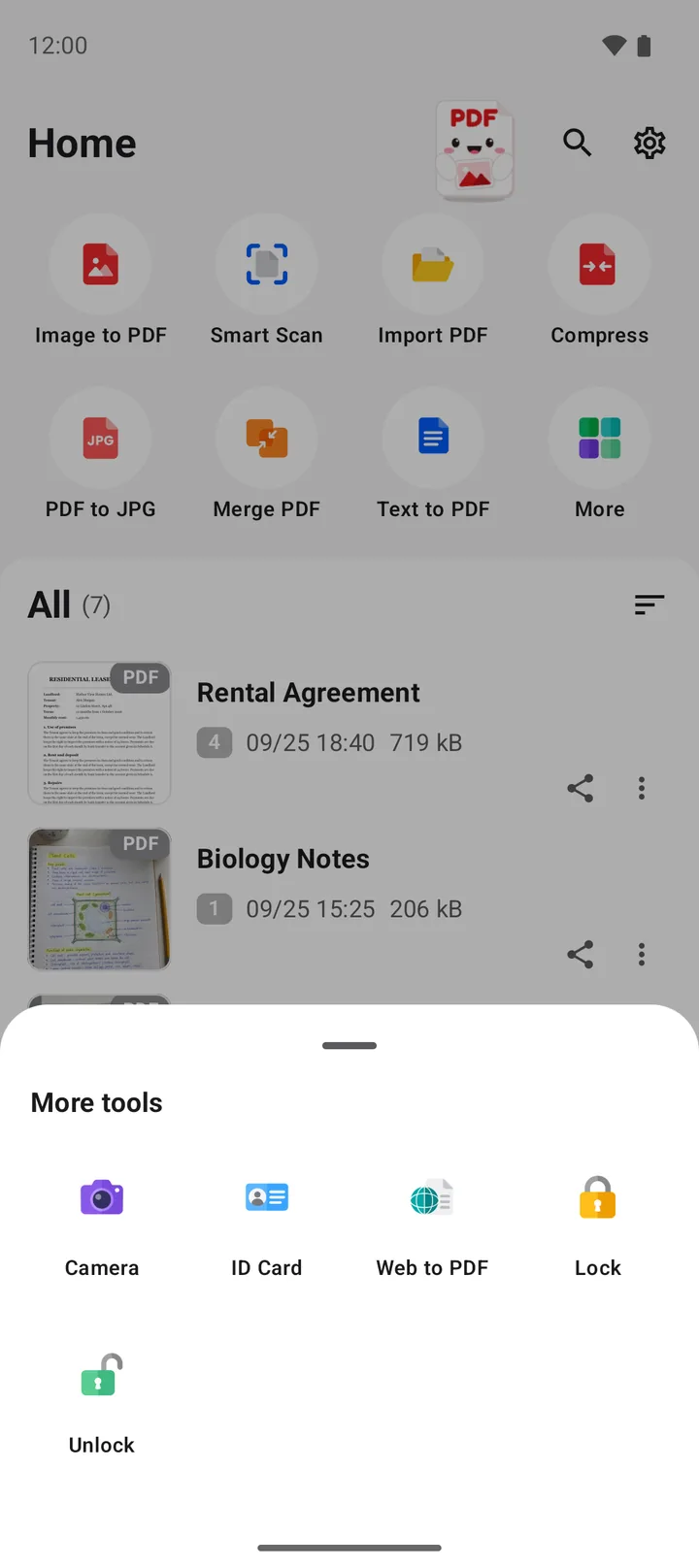
To unlock a PDF on Android, you need its password. In PDFriend, tap More, then tap Unlock. Pick the PDF, type the password and tap Remove. The app saves a copy without the password, with "(unlocked)" at the end of the name. The app does not crack or bypass a password.
How do you unlock a PDF with the Unlock tool?
The Unlock tool saves a copy of a PDF without the password. You type the password one time. After that, the copy opens in every PDF viewer without a password. The app does the work on your phone, so the PDF does not go to a server.
-
Open the Unlock tool
Open PDFriend. On the home screen, tap More, then tap Unlock.
-
Pick the PDF
Select the PDF that has the password.
-
Type the password
The app shows "Type the password of" and the file name. Type the password of the PDF.
-
Tap Remove
Tap Remove. The app saves an unlocked copy with "(unlocked)" at the end of the name.
The copy keeps the pages, the text and the images of the original PDF. Only the password protection goes away. For example, "Contract.pdf" gives the copy "Contract (unlocked).pdf". If you unlock "Contract (locked).pdf", the copy is also "Contract (unlocked).pdf", with one mark only. If a file with that name exists, the app adds a number, for example "Contract (unlocked) (1).pdf".
How do you remove the password from the file list?
If the PDF is already in the PDFriend list, you do not need to pick it again:
- Tap the More menu (three dots) next to the file.
- Tap Remove password.
- Type the password, then tap Remove.
The result is the same as with the Unlock tool: a new copy with "(unlocked)" at the end of the name.
Can you unlock a PDF if you do not know the password?
No. PDFriend removes a password only when you type the correct password. The app does not crack, guess or bypass a password. A PDF with strong encryption protects its content from everybody who does not have the password.
If you forgot the password, try these steps:
- Ask the person or the company that sent the PDF. Banks and offices often use a known rule, for example a date of birth or a customer number.
- Look in the email or the letter that came with the PDF. The password is often there.
- Ask the sender for a new copy of the file.
Warning: do not upload a private PDF to an unknown website that promises to remove a password. The website gets a copy of your document.
What do the unlock messages mean?
| Message | Meaning | What to do |
|---|---|---|
| The password is wrong. | The password does not open the PDF. | Check the capital letters and type it again. |
| The file has no password. | The PDF opens without a password. | Use the file as it is. |
| Saved as ... | The unlocked copy is ready. | Open the copy from the file list. |
Why remove the password from a PDF?
A password protects a PDF when you send it or store it. But some tasks need a PDF without a password:
- Merge. Merge PDF cannot join a file with a password. It shows "One of the files has a password. Remove the password first." Read how to merge PDF files on Android.
- Compress, PDF to JPG and annotate. These tools also need a PDF without a password.
- Daily use. You open your own file often and do not want to type the password each time.
To view a PDF with a password, you do not need to unlock it. The PDFriend viewer asks for the password and opens the file. When you finish the work, you can protect the result again. Read how to put a password on a PDF.
Tip: delete the unlocked copy when you do not need it. The copy has no protection, so anybody with access to the phone can open it.
Questions and answers
Can I unlock a PDF without the password?
No. PDFriend needs the correct password to remove it. The app does not crack, guess or bypass a password. If you forgot the password, ask the person who made the PDF.
Does unlocking a PDF change the original file?
No. PDFriend saves a new copy without the password. The name of the copy ends with "(unlocked)". The original PDF keeps its password.
Where does PDFriend save the unlocked PDF?
On Android 10 and later, the unlocked copy goes to Documents/ImageToPDF. It also shows in the file list of the app.
What does it mean when the app says that the password is wrong?
The password that you typed does not open the PDF. Check the capital letters and the keyboard language, then type it again. Tap the eye icon to see what you typed.
Why does the app say that the file has no password?
The PDF opens without a password, so there is nothing to remove. You can use the file as it is.
Why must I unlock a PDF before I merge it?
PDFriend cannot read the pages of a PDF with a password in Merge PDF, Compress, PDF to JPG or Annotate. Unlock the PDF first, then use the unlocked copy.